Impressions Are Up, Clicks Are Down: How to Diagnose the Real Impact of AI Overviews in Search Console
Last updated: July 28, 2026 If Search Console shows stable or rising impressions alongside falling clicks and CTR, that’s one of the clearest fingerprints of AI Overviews eating into your organic traffic. Since June 3, 2026, Google has offered a dedicated “Search Generative AI performance” report in Search Console, showing for the first time exactly […]


Last updated: July 28, 2026
If Search Console shows stable or rising impressions alongside falling clicks and CTR, that’s one of the clearest fingerprints of AI Overviews eating into your organic traffic. Since June 3, 2026, Google has offered a dedicated “Search Generative AI performance” report in Search Console, showing for the first time exactly how often your pages appear in AI Overviews, AI Mode, and Discover’s generative AI features. That’s a genuine step forward — but the report currently shows impressions only, not clicks. It won’t answer “how much traffic am I actually losing to AI Overviews” on its own — you still need the indirect diagnostic process covered in this guide.
Short answer: a drop in clicks alongside stable impressions doesn’t automatically mean AI Overviews. Before you rebuild any content, check, in order: (1) whether the new AI report in Search Console shows rising impressions in generative features for those queries, (2) whether the drop lines up in time with an announced Core Update, (3) whether the problem affects a handful of queries or entire site sections, and (4) whether it’s ordinary seasonality. Only after ruling out the other three should you treat AI Overviews as the primary cause.
The new Search Console report: what it shows, and what it doesn’t
On June 3, 2026, Google announced dedicated “Search Generative AI performance” reports in Search Console via its Search Central Blog — a standalone section showing site visibility inside AI Overviews, AI Mode, and generative AI features in Discover, separate from the standard Performance report (developers.google.com). This isn’t newly collected data: AI impressions were always folded into the overall Performance totals; what’s new is a dedicated view that isolates just the generative-AI slice (support.google.com).
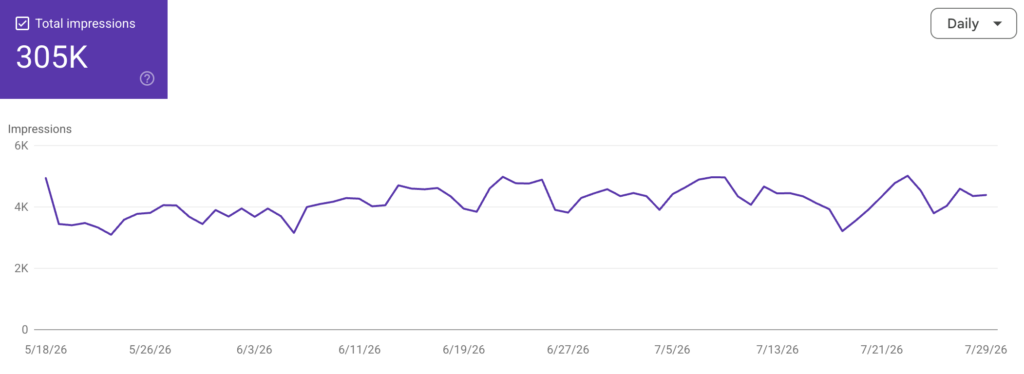
The report exposes five dimensions: impressions, pages (which specific URLs surfaced inside AI features — a breakdown not available anywhere else in the platform), countries, devices, and dates at granularities from hourly to monthly (ppc.land). The biggest limitation: as of this writing, the report includes no click, CTR, or query data. You can confirm your page appeared inside an AI Overview, but you cannot yet tell whether anyone clicked through from that answer. Google has indicated it may add further metrics over time, without a confirmed timeline.
A second important limitation: there is no historical backfill. Early observers report the data only reaches back to roughly mid-May 2026, so there’s no way to reconstruct a longer trend. Every week without a captured baseline is a week of data you won’t be able to recover later.
Alongside the report, Google also introduced a new toggle letting site owners block their content from AI Overviews, AI Mode, and Discover AI, without affecting rankings in traditional organic search results — this control is explicitly not a ranking signal outside the generative features themselves, which matters for publishers weighing whether to opt out.
Why the AI report alone isn’t enough — you still need indirect diagnosis
Before the new report existed (and still, until it adds click data), the industry has relied on three indirect patterns inside the standard Performance report:
- Impressions climb, CTR falls. A query gathers more impressions over time, but CTR steadily declines despite a stable position — a sign that something above the organic results is intercepting the click.
- Position holds steady, clicks decline. You’ve held position 3–5 for months, and clicks are falling quarter over quarter with no seasonality shift and no new competitor in the top 3.
- Informational queries dominate the losses. The steepest CTR drops concentrate on “what is,” “how does,” “can you” queries — exactly the type AI Overviews answers most readily.
These three patterns are indirect signals, not proof. Confirming them requires manual verification: open Google in incognito mode, run the query, and check whether an AI Overview actually appears. For 10–20 priority queries, a weekly manual check is enough; at larger scale you need a SERP-monitoring tool.
Let your customers find you, wherever they look.
Telling AI Overviews apart from a Core Update, seasonality, or a technical issue
This is the key diagnostic question, and the most common mistake is skipping the alternative explanations. A short decision path:
- Check the timing. If the drop coincides exactly with an announced Core Update or Spam Update, you’re more likely looking at a content-quality reassessment than at AI Overviews.
- Check the scope. A Core Update typically affects many similar pages across an industry, visible in both impressions and clicks across many URLs. AI Overviews behaves differently: position and impressions stay stable, and only CTR drops.
- Check the content type. Core Updates hit generic, mass-produced content without a byline or sources hardest. AI Overviews hits purely informational content — the kind that can be summarized in a few sentences without losing value — hardest.
- Check indexing and technical errors first. A sudden drop confined to organic traffic, combined with indexing errors (404s, noindex, robots blocks), points to a technical problem, not an algorithmic one or AI Overviews.
- Check seasonality. Correlation with holidays, vacation periods, or a competitor’s ad spend usually points to a natural fluctuation rather than an algorithmic shift.
Two independent studies on Polish data confirm the scale of the phenomenon: an analysis of 452 Polish domains using GSC data from January 2024 to June 2025 found CTR down more than 20% in May and June 2025 year over year, with the trend visible across 89% of the domains studied — more pronounced for service pages than e-commerce. A separate analysis of 17 million keywords (Senuto) found AI Overviews active on 33.9% of queries ranking positions 1–10 (June 2025 vs. June 2024 data). Both studies flag explicitly that GSC’s standard Performance report doesn’t precisely isolate AIO impressions and clicks — which is exactly the gap the new dedicated report is meant to close.
Not every lost click is worth the same
It’s worth separating two business scenarios. If an article’s entire value boils down to a simple definition or basic fact, the user gets their answer inside the AI Overview and has no reason to click through — typical for purely informational content. Content whose value requires going deeper — comparisons, calculators, offers, company-specific figures — is more resilient: an AI Overview can supply general context, but it won’t replace a purchase decision or checking a specific offer. That means the response to a CTR drop shouldn’t be identical across every content type.
Diagnostic checklist
- [ ] Check whether your property has access to the “Search Generative AI performance” report (phased rollout since June 3, 2026).
- [ ] Start capturing an AI impressions baseline now — data from before mid-May 2026 doesn’t exist.
- [ ] Shortlist 10–20 priority informational queries and manually check (incognito mode) for AI Overview presence weekly.
- [ ] In the standard Performance report, look for the pattern: stable/rising impressions + falling CTR at a stable position.
- [ ] Check announced Core Update and Spam Update dates against the timing of your drop.
- [ ] Check the scope: isolated queries (possible fluctuation) vs. whole site sections over several weeks (a persistent problem).
- [ ] Verify Coverage (indexing errors) and Security & Manual Actions in GSC before attributing the cause to an algorithm.
- [ ] Split content into “purely informational” (more exposed) and “requires a deeper decision” (more resilient) — the response should differ by group.
- [ ] Decide deliberately whether to use the new opt-out toggle — this is a business call, not a technical necessity.
FAQ
Not directly. It shows impressions — how often your pages appeared in AI Overviews and AI Mode — but as of now it includes no click or CTR data. Estimating lost traffic still requires combining it with indirect diagnosis inside the standard Performance report.
A Core Update typically affects many similar pages across an industry, visible in both impressions and clicks. AI Overviews behaves differently — position and impressions stay stable, and only CTR falls, most sharply on purely informational queries.
Yes. The new Search Console toggle lets you opt content out of AI Overviews, AI Mode, and Discover AI without affecting rankings in standard search results — it’s a separate mechanism, not a ranking signal.
No. Purely informational content that can be summarized without losing value is most exposed. Content requiring a deeper decision — offers, comparisons, company-specific data — is more resilient.
Manually checking 10–20 queries takes a few hours a week. A full analysis combining GSC data, Core Update timing, and content type typically takes a few days of analytical work, depending on site size.
The new AI report in Search Console is a genuine step toward transparency — for the first time, you can see directly which pages surface in AI Overviews and AI Mode without guessing. But until it includes click data, it doesn’t remove the diagnostic work: you still need to separate AI Overviews from a Core Update, seasonality, and technical errors before deciding to rebuild any content.
If you want confidence that a click drop is genuinely an AI Overviews effect — and not something faster and cheaper to fix, like an indexing error or a Core Update ranking loss — an SEO audit is the place to start; it separates these scenarios using hard data from GSC and GA4. If the diagnosis confirms the real issue is the structure of the content itself — that your articles are handing AI a ready-made answer instead of a reason to click through — that’s what AI-search content optimization (Semantic Booster) is built to fix.
Sources: Google Search Central Blog and Google Search Console documentation (developers.google.com, support.google.com), independent coverage of the June 3, 2026 announcement (ppc.land, PinMeTo, pikaseo.com, weblumino.com, crawlvision.com, 6smarketers.com), Polish industry analyses and proprietary data (seogroup.pl, jakubsawa.pl, aivisible.pl, adspectra.pl, seosklep24.pl, marketingonline.pl, seostation.pl), two independent studies on Polish data (Senuto — 17 million keywords, Grupa ICEA — 452 Polish domains). This topic moves fast — the AI report rollout is still phased; a quarterly review is recommended.
more