Technical SEO Audit – Don’t Promote Your Website Without It
TL;DR Even a well-built website can lose to competitors if search engines struggle to crawl or understand it. Content and links can’t help pages that aren’t indexed. That’s why a technical audit should come before any SEO, paid or social campaign. What does a technical SEO audit cover? Area What we check Typical problems Crawling […]

TL;DR
- A technical SEO audit finds the problems that stop search engines and AI crawlers from crawling, rendering, indexing and understanding your site, and tells developers exactly how to fix them.
- In 2026 it covers more than crawling and metadata: JavaScript rendering, Core Web Vitals, structured data, hreflang, faceted navigation, logs and AI crawler access.
- Do it before promoting a site, before and after a migration, and whenever traffic drops for no clear reason.
- The audit is only half the work: implementation with SEO supervision and post-implementation checks decide whether it pays off.
Even a well-built website can lose to competitors if search engines struggle to crawl or understand it. Content and links can’t help pages that aren’t indexed. That’s why a technical audit should come before any SEO, paid or social campaign.
Let your customers find you, wherever they look.
What does a technical SEO audit cover?
| Area | What we check | Typical problems |
|---|---|---|
| Crawling and robots.txt | Which URLs bots can reach, robots.txt rules, crawl paths | Important sections blocked, staging rules on production |
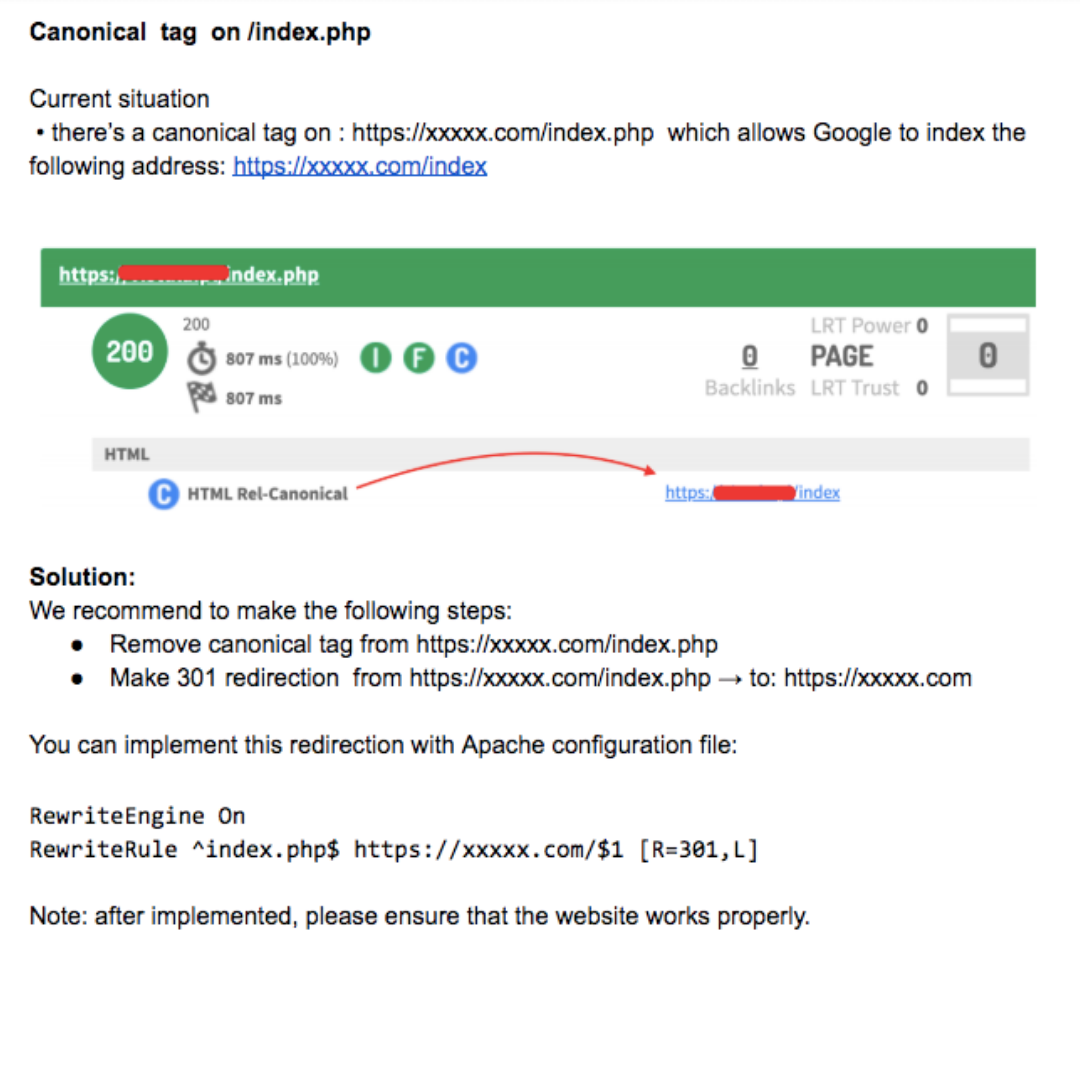
| Indexing | Indexed vs excluded pages, noindex, canonical tags | Key pages excluded, wrong canonicals (indexing problems) |
| Rendering and JavaScript | Raw vs rendered HTML, content and links without JS | Content or menus visible only after JS |
| Status codes and redirects | 4xx, 5xx, redirect chains and loops | Internal links to 404s, mass redirects to the home page |
| Site structure and internal links | Click depth, orphaned pages, anchor texts | Deep or orphaned key pages (category tree) |
| Duplicate content | Parameters, filters, sorting, http/https, www | Thousands of near-identical URLs |
| Faceted navigation (e-commerce) | Which filter URLs are crawlable and indexable | Crawl budget spent on filter combinations |
| Core Web Vitals | LCP, INP, CLS from field data; key templates | Slow LCP image, heavy scripts (UX in SEO) |
| XML sitemaps | Only indexable, canonical URLs with 200 status | Redirects, noindex or 404s in the sitemap |
| Metadata and headings | Titles, descriptions, H1–H3 | Missing or duplicate titles and H1s |
| Images | Alt text, formats, sizes, lazy loading | Missing alt, huge files, lazy-loaded LCP image |
| Structured data | Organization, Product, Breadcrumb, Article | Errors, markup not matching the page (structured data) |
| International (if relevant) | hreflang, language versions | Missing return tags, wrong codes (international SEO) |
| AI crawlers | robots.txt rules for AI bots, content in raw HTML, log data | AI search bots blocked by accident; content invisible without JS |
For online stores we also check registration, login, cart and checkout templates, and product pages at scale (product page SEO). For large sites, server logs show which URLs Googlebot and AI crawlers actually request (crawl budget).
Most AI crawlers don’t render JavaScript (Vercel), so content and links must be in the HTML the server sends. An llms.txt file is optional; Google has said it doesn’t use it (SEL).
How is a technical SEO audit carried out?
- Access and data: user access to Search Console, GA4 and, if possible, server logs. Never share passwords; your company stays the owner of the accounts (Google).
- Crawl and tests: a full crawl with and without JavaScript rendering, Core Web Vitals data, structured data tests (technical SEO tools, DevTools).
- Manual analysis: what tools can’t judge, such as cannibalisation, wrong priorities in robots.txt, template logic and business context.
- Recommendations and priorities: each issue with its impact, affected URLs, a precise fix for your technology, and priority (impact vs effort).
- Implementation support and verification: answers for developers, checks on staging and after release, and a re-crawl to confirm every fix.
The result is a list of specific instructions a developer can act on, not a generic list of “errors”.
What’s the difference between a professional and a free audit?
| Free / automatic audit | Professional technical audit | |
|---|---|---|
| Scope | Often a sample of pages or a standard checklist | The whole site, all key templates |
| Interpretation | Lists warnings, many irrelevant | Explains which issues matter for your site and why |
| Recommendations | Generic (“reduce page size”) | Specific to your CMS, templates and code |
| Priorities | None or by number of warnings | By business impact and effort |
| Implementation | Not included | Support for developers and post-release checks |
A free audit is like a check-up with a GP: it shows the general condition and where to look closer. A professional audit is the specialist’s diagnosis and treatment plan. Its cost reflects professional tools and many hours of a technical SEO specialist’s work.
When should you carry out a technical SEO audit?
- Before promoting a site with SEO, ads or social media, so you don’t pay to send traffic to pages with problems.
- Before and after a redesign or migration, the moment when sites lose the most traffic (site moves, SEO and development).
- When organic traffic drops and changes in strategy don’t help.
- Regularly, at least once a year for most sites and more often for large stores; together with a content audit.
What happens if you skip the audit?
- SEO work doesn’t pay off: content and links can’t help pages that aren’t indexed or are canonicalised to other URLs.
- Users leave: slow pages and broken templates hurt engagement and conversions in paid and organic traffic alike (Core Web Vitals).
- Trust drops: internal search and product links that end in “page not found” send shoppers to competitors.
Case study: a migration without an audit
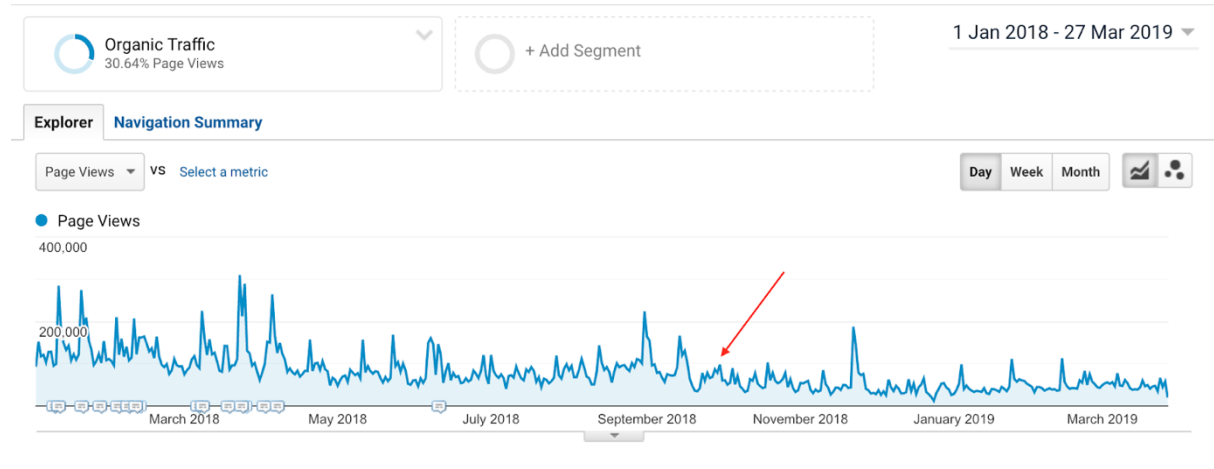
After moving to a new platform, one of our clients saw organic traffic fall steadily. Our audit found serious errors in the new site architecture that limited visibility. Implementing an 80-page audit took months. Working with a technical SEO specialist during development and migration would have prevented most of it.
Make your brand visible – from Google to AI chatbots.
Why isn’t buying an audit enough?
Implementing the recommendations is usually the hardest part. It’s rarely about bad intentions or skills in the IT team; it’s that SEO recommendations depend on each other in ways that aren’t obvious from a task list. These are the problems we see most often:
Splitting dependent recommendations between people
An audit recommends removing URLs that return 404 from the XML sitemap and redirecting removed pages to their closest equivalents. Two developers handle these separately. One sets redirects first, some to the home page; the other then removes from the sitemap every URL that “doesn’t work” and, without noticing the redirect, removes the home page too. Dependent tasks need one owner and the right order.
Changing priorities without SEO context
The main problem is indexing: pages with unfriendly URLs sit outside the site structure, have noindex tags, and there’s no sitemap. IT fixes the URLs, adds links to the menu and creates a sitemap, but misses the noindex tags. The pages are now friendly, linked and listed, and still not indexed. One “small” item made the rest pointless (indexing problems).
“Equivalent” solutions that aren’t
The audit asks for an H1 heading with short text on the home page. A developer, to save time, uses an image with the text styled in it and wraps it in an H1 tag. It looks the same, but search engines and AI crawlers get much less information from an image than from HTML text.
How to avoid it
- Keep a technical SEO specialist involved during implementation to answer questions and review solutions.
- Group dependent recommendations into one task with one owner.
- Agree on priorities together with SEO, not only by development effort.
- Check changes on staging before release and re-crawl after release; submit changed URLs via sitemaps or IndexNow for Bing.
How do you choose a technical SEO audit offer?
Almost every agency offers an audit, but scope and depth differ widely. Before you order one, ask (questions to ask an SEO agency):
- Which areas does it cover, and which matter most for your business (for example faceted navigation for a store, hreflang for international sites)?
- How will recommendations be presented: by priority, with affected URLs and fixes for your technology?
- Is a technical SEO specialist available during implementation?
- Is a post-implementation check included?
FAQ
How long does a technical SEO audit take?
Usually 2–4 weeks for a typical company site and longer for large online stores, depending on size and access to data.
How often should you do a technical SEO audit?
At least once a year, before and after migrations, and whenever traffic drops without a clear reason. Large sites benefit from continuous monitoring.
What access does an auditor need?
User access to Search Console and GA4, and ideally server logs and a staging environment. Never share passwords.
Does a technical audit cover AI search?
It should: whether AI crawlers can access the site, whether content is in plain HTML, and how structured data and site structure help AI systems understand your pages.
Is a free SEO audit enough?
It’s a useful first look, but it doesn’t interpret problems for your site or give fixes specific to your technology.
Sources
- Google Search Central: HTTP status codes and network errors and Soft 404 errors
- Google Search Central: Consolidate duplicate URLs
- Google Search Central: Managing crawl budget for large sites
- Google Search Central: JavaScript SEO basics
- Google Search Central: Site moves with URL changes
- web.dev: Web Vitals
- Search Console Help: Owners, users and permissions and Analytics Help: Access management
- Vercel: The rise of the AI crawler
About the author: This article was prepared by the Insightland SEO and GEO team. Insightland is a Wrocław-based agency, part of the Hexe Capital Tech Hub, that connects business, tech and data: SEO and GEO, performance marketing, UX and analytics, and SEO and AI training. Contact us.
more
Related blog posts

Impressions Are Up, Clicks Are Down: How to Diagnose the Real Impact of AI Overviews in Search Console
31 Jul 2026 • Insightland

Why doesn't one-off website optimization deliver long-term benefits to your business?
05 May 2022 • Irena Zobniow