Are your product descriptions ready for AI-driven search assistants?
Product descriptions became the data foundation that AI-driven systems rely on to match intent-driven queries with the right products. Learn how to get them ready for AI search.

Key takeaways
- AI shopping assistants match products to detailed, conversational questions, so a product without the right attributes simply doesn’t qualify for the answer.
- AI assistants get product data from three places: product feeds (Google Merchant Center, OpenAI’s product feed), your product page and third-party sources such as reviews and comparisons.
- Google’s AI Mode and Gemini draw on the Shopping Graph, which holds more than 60 billion product listings fed largely by Merchant Center.
- Put key facts (price, availability, specs) in the visible HTML of the page. In tests, AI assistants fetching pages ignored data that existed only in JSON-LD.
- AI referrals are worth it: in the 2025 holiday season, traffic from generative AI to US retail sites grew 693% and converted 31% better than other sources (Adobe).
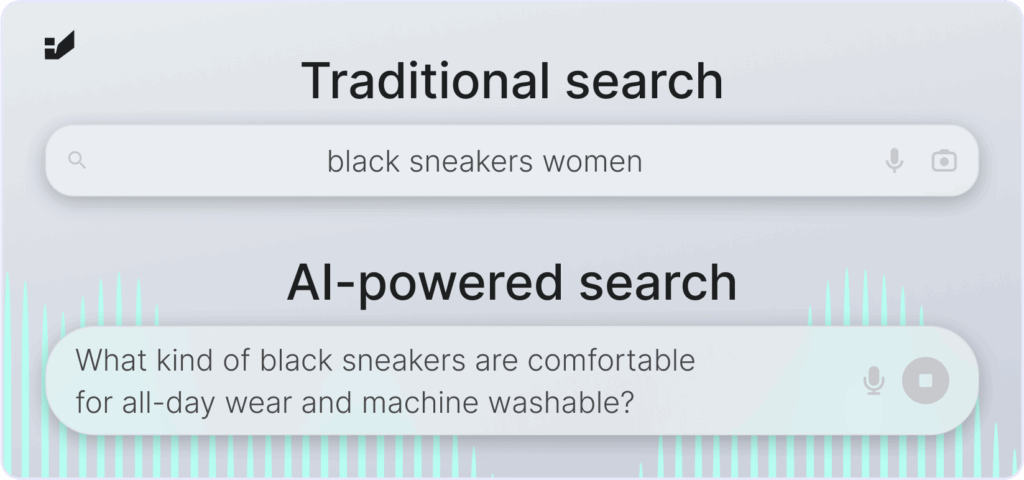
Not long ago, product descriptions were written mostly for search engines, with keywords added to win rankings. Today, many shoppers describe what they need to an AI assistant instead. Rather than typing “black running shoes”, they ask: “Which lightweight shoes are best for trail running in wet conditions?” or “Show me vegan skincare under $30 available for same-day delivery.”
To answer, the assistant has to match every part of the question (use, conditions, price, delivery) to facts about real products. Product descriptions and product data are no longer just marketing copy. They are the data AI systems use to decide which products to recommend.
How do AI assistants find and recommend products?
Short answer: from three sources: structured product feeds, the product page itself and what other websites say about the product.
| Source | What it is | Who uses it |
|---|---|---|
| Product feeds | Structured product data you submit: titles, descriptions, prices, availability, GTINs, images, shipping | Google AI Mode, AI Overviews and Gemini (via Merchant Center and the Shopping Graph); ChatGPT (OpenAI product feed, Shopify Catalog) |
| Your product page | The visible content of the page, fetched by search engines and AI crawlers | Google and Bing indexes; AI assistants that browse pages live |
| Third-party sources | Reviews, comparisons, marketplaces, forums, video reviews | All assistants, especially for “best” and “vs” questions |
- Google’s Shopping Graph held more than 60 billion product listings in May 2026. Google says about 2 billion listings are refreshed every hour. Merchant Center is the main way your products get into it.
- ChatGPT shows product options with images, prices and links. In March 2026, OpenAI moved away from in-chat checkout and refocused on product discovery: ChatGPT recommends, and the purchase happens on the merchant’s site. Your product page still has to convert.
In practice, this means a product needs complete data in your feeds, clear facts on its page and a reputation that other sources confirm.
Why do AI-ready product descriptions matter?
1. Higher-intent traffic
Adobe Analytics data for the 2025 holiday season showed traffic from generative AI tools to US retail sites up 693% year on year. Those visits converted 31% better than traffic from other sources. Shoppers who have already compared options with an assistant arrive closer to buying.
2. Eligibility for detailed questions
AI questions carry constraints: “machine washable”, “under $30”, “for sensitive skin”, “delivered tomorrow”. If an attribute is missing from your feed and page, the assistant can’t confirm that your product fits, so it recommends one that it can confirm.
3. Accurate answers about your products
When data is incomplete or inconsistent, assistants fill the gaps from other sources or describe the product wrongly. Complete, consistent data is the best protection against wrong prices, sizes or features in AI answers.
Let your customers find you, wherever they look.
How to write AI-ready product descriptions
1. Be comprehensive and precise
Go beyond marketing claims. Each description should cover:
- Technical details: materials, dimensions, weight, ingredients, compatibility, specifications.
- Functional benefits and use cases: who it’s for and in which situations it works best.
- Limitations: for example “not waterproof”, “requires USB-C charging” or “not suitable for children under 3”. Honest limits help assistants match the product correctly.
| Instead of | Write |
|---|---|
| Waterproof jacket | Waterproof to 10,000 mm with taped seams. Keeps you dry in heavy rain on hikes of up to a full day. |
| Comfortable sneakers | Cushioned EVA midsole and a wide toe box, designed for all-day standing. Machine washable at 30°C. |
| Gentle face cream | Fragrance-free, vegan formula with 2% niacinamide. Dermatologically tested on sensitive skin. |
| Fast delivery | Order by 2 pm for next-day delivery in Poland. Free returns within 30 days. |
2. Answer the questions shoppers actually ask
Write descriptions that read like answers. Instead of “Leather jacket, black”, try: “This black leather jacket is made for everyday wear. It blocks wind, has two zipped inside pockets and goes with both jeans and formal trousers.” To find the questions, look at your on-site search, customer service emails, reviews and the questions people ask assistants in your category. More on this in intent-based search.
3. Keep key facts in visible text, not only in code
In a searchVIU experiment, AI assistants that fetched a test product page live extracted only the content visible in the HTML. Prices that existed only in JSON-LD or hidden markup were ignored, and most systems didn’t run JavaScript either. Put price, availability, main specifications and a summary of reviews in the page’s initial HTML, and check a product page with JavaScript switched off.
4. Keep feed, page and structured data consistent
Use Product structured data (with Offer, price, availability, GTIN and reviews) and a complete Merchant Center feed, and make sure both say exactly what the page says. Google relies on this data for product listings and the Shopping Graph. Mismatched prices or stock between feed, markup and page undermine trust. Don’t expect markup alone to get you cited, though. Research shows adding schema doesn’t by itself increase AI citations. See 10 AI search myths and structured data in AI search.
5. Use consistent terminology across languages
Poor translations cost visibility in every market. If “running shoes” becomes “sports shoes” in another language, assistants may classify the product differently. Keep a glossary of product terms per market and use it in descriptions, feeds and filters. See international SEO.
6. Show real reviews and Q&A
Customer reviews, Q&A and FAQs show how real people describe and use the product, which helps assistants match it to similar questions. Display them on the page as text, answer questions publicly and never write fake reviews.
7. Include up-to-date availability, delivery and returns
An assistant can only say “in stock in your size and delivered tomorrow” if that information is present and current. Keep stock and prices updated in your feed as often as your platform allows, and set shipping and returns policies in Merchant Center as well as on the page.
Beyond text: images, video and visual search
Visual search is already mainstream. Google says Lens handles more than 25 billion visual searches a month, and roughly one in five has commercial intent. Shoppers photograph an old backpack and ask for a waterproof replacement, or screenshot an outfit and look for similar items.
- Use several high-quality images per product, including detail shots and the product in use.
- Write alt text that describes the product and its key attributes (“black waterproof 30 L hiking backpack with roll-top closure”), not just the name.
- Add product videos with titles, descriptions and transcripts.
- Make sure images match the exact variant in the feed (colour, size, model).
Product feed checklist for AI shopping
- Merchant Center account with free listings enabled, not just Shopping ads.
- Identifiers filled in: GTIN, brand and MPN.
- Key attributes complete: colour, size, material, pattern, age group, gender and product type (see Google’s product data specification).
- Descriptive titles and descriptions in the feed, consistent with the product page.
- Shipping costs, delivery times and returns policy configured.
- Price and availability updated frequently, ideally automatically.
- For ChatGPT: Shopify stores are included through Shopify Catalog; other platforms can submit OpenAI’s product feed.
- Robots.txt allows search and AI crawlers such as Googlebot, Bingbot and OAI-SearchBot to reach product pages.
A practical checklist for AI-ready product pages
| Check | Why it matters |
|---|---|
| Each product has features, benefits, use cases and limitations | Lets assistants match constraint-based questions |
| Price, availability and key specs are in the visible HTML | AI assistants fetching pages read visible text |
| Product structured data matches the page and the feed | Google uses it for listings; mismatches undermine trust |
| Merchant Center feed is complete and updated often | Main route into Google AI Mode and Gemini shopping |
| Terminology is consistent across languages | Products are classified correctly in each market |
| Reviews and Q&A are visible as text | Real phrasing helps matching and builds trust |
| Images and videos have descriptive alt text and metadata | Supports visual search and multimodal answers |
| Delivery, returns and stock are clearly stated | Assistants can answer practical questions |
How do you check whether AI understands your products?
- Ask ChatGPT, Gemini, Perplexity and Google AI Mode the questions your customers ask, including constraints such as price, use and delivery.
- Note whether your products appear and whether the facts (price, sizes, features) are correct.
- Open a product page with JavaScript switched off and check that price, availability and specs are still visible.
- Review Merchant Center diagnostics for missing attributes and disapproved products.
- Track AI referral sessions and their conversions in GA4. See metrics that matter in AI search.
- Repeat after every major update, since AI answers vary from run to run and product data changes. Read more about content decay.
What comes next: agentic commerce
Assistants are moving from recommending products to helping complete purchases. Google rolled out agentic checkout features in AI Mode for the 2025 holiday season, and merchants can build their own shopping experiences inside ChatGPT. Whatever form this takes, it relies on the same thing: accurate, complete and consistent product data. If your descriptions are still short, generic and written only for keywords, now is the time to fix them.
Boost sales with SEO + GEO.
FAQ: product descriptions and AI search
How does ChatGPT choose which products to recommend?
ChatGPT combines structured product data (from merchant feeds and Shopify Catalog), information it finds on the web and what other sources say about the product. Products with complete, consistent data and good reviews are easier for it to match to a shopper’s question. Since March 2026, purchases happen on the merchant’s site.
How do I get my products into Google AI Mode?
Submit a complete product feed to Google Merchant Center and enable free listings. AI Mode draws on the Shopping Graph, which is fed largely by Merchant Center, so complete attributes (GTIN, brand, size, colour, material), accurate prices and stock, and shipping and returns settings all matter.
Do AI assistants read schema markup on product pages?
Google uses structured data and feeds for product listings. But in tests, AI assistants that fetched pages live read only the visible HTML and ignored data that existed only in JSON-LD. Keep structured data, and make sure the same facts are visible on the page.
How long should a product description be?
Long enough to cover the attributes, use cases and limitations a shopper needs to decide, and no longer. For simple products, a few precise sentences plus a specification table may be enough. For complex or expensive products, add sections that answer common questions.
Should I use AI to write product descriptions?
AI can help produce drafts at scale, but every description needs accurate product data and human review. Generic text that repeats what other stores say doesn’t help assistants tell your product apart, and factual errors can spread into AI answers.
Does traffic from AI assistants actually convert?
According to Adobe, traffic from generative AI tools to US retail sites converted 31% better than other traffic sources during the 2025 holiday season, after converting worse earlier in 2025. Results vary by store and category, so track AI referrals separately in your analytics.
Sources
- Adobe: AI-driven traffic surges across industries (January 2026)
- PPC Land: Google Shopping Graph (2026)
- Talon.One: ChatGPT Shopping and Instant Checkout (March 2026)
- searchVIU: Schema markup and AI in 2025, what ChatGPT, Claude, Perplexity and Gemini really see
- Ahrefs: We tracked 1,885 pages adding schema (May 2026)
- Scalevise: Google Lens tops 25 billion monthly searches (2026)
- Google Search Central: Product structured data
- Google Merchant Center: Product data specification
About the author: This article was prepared by the Insightland SEO and GEO team. Insightland is a Wrocław-based agency, part of the Hexe Capital Tech Hub, that connects business, tech and data: SEO and GEO, performance marketing, UX and analytics, and SEO and AI training. Contact us.