Measuring data from generative chatbots
Generative Chatbots like Perplexity and ChatGPT successfully display links to specific products, categories, or forum articles – either in their responses or as sources. The need to appear in the answer provided by a chatbot, to obtain additional organic traffic, is the first step.

Key takeaways
- You can now measure AI chatbot visibility with free first-party data: Search Console’s Generative AI report, Bing Webmaster Tools’ AI Performance report and GA4’s AI Assistant channel.
- GA4 shows visits and conversions from ChatGPT, Gemini, Claude and other assistants, but misses visits without a referrer or consent.
- Server logs show what analytics can’t: visits from AI bots such as OAI-SearchBot, ChatGPT-User, ClaudeBot and PerplexityBot, and which pages they fetch.
- A ChatGPT-User visit means ChatGPT fetched your page for a user, not that it showed your link. Use it as a signal, not a count of impressions.
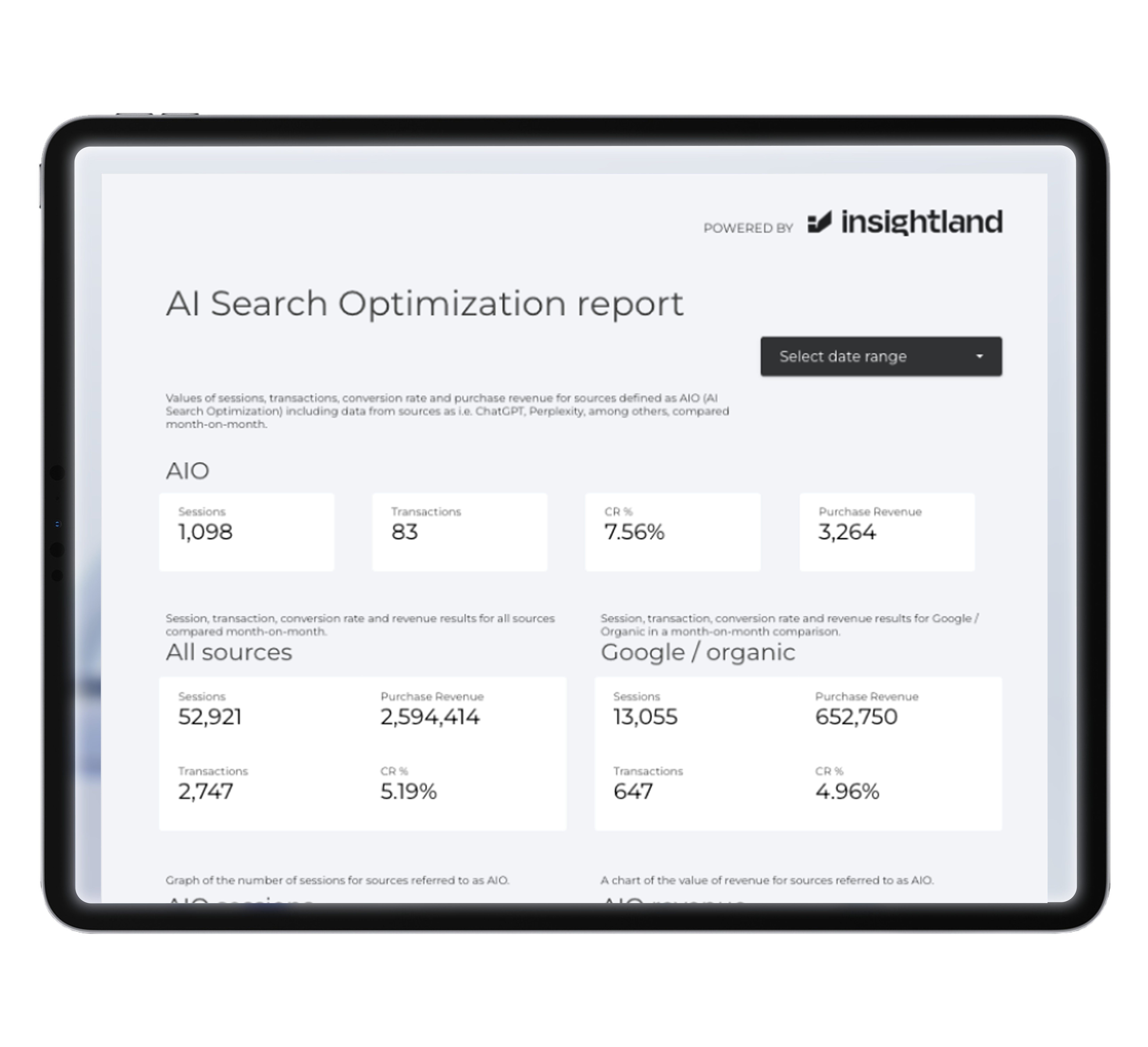
- Our free Looker Studio report brings AI traffic, conversions and revenue into one view.
AI chatbots such as ChatGPT, Perplexity, Gemini and Copilot show links to products, categories and articles, in answers and as sources. ChatGPT alone had 900 million weekly users in February 2026. Getting into those answers is the first step; measuring the result is what lets you judge the return on that work.
Until 2026, that was hard: search tools didn’t report chatbot data, so we built workarounds. Today, part of the data is available natively. This guide shows how to combine the new reports, GA4, Looker Studio and server logs into a complete picture.
Make your brand visible, from Google to AI chatbots.
Which data sources show AI chatbot activity?
| Source | What it shows | What it misses |
|---|---|---|
| Search Console: Generative AI report | Impressions of your pages in Google AI Overviews and AI Mode | Clicks, queries; other AI platforms |
| Bing Webmaster Tools: AI Performance | Citations in Copilot and Bing AI answers, cited pages, grounding queries | Clicks; non-Microsoft platforms |
| GA4: AI Assistant channel | Sessions, engagement, key events and revenue from AI assistants | Visits without referrer or consent; impressions |
| Server logs | Visits by AI crawlers and user-triggered fetchers, per URL | What users saw in the answer |
| Prompt monitoring tools | Mentions, citations and share of voice for your prompts | Real traffic and revenue |
Bing Webmaster Tools: Copilot citations
When we first tested Bing Webmaster Tools in 2025, data from Copilot chats appeared only in a very limited, anonymised form, and our own clicks on test links weren’t recorded. That changed in February 2026, when Bing launched the AI Performance report. It shows how often your pages are cited in Microsoft Copilot and Bing’s AI answers, which pages are cited and the “grounding queries” behind them. It doesn’t show clicks, so pair it with GA4.
Google Search Console: AI Overviews and AI Mode
Since June 2026, Search Console has a Generative AI report showing impressions of your pages in AI Overviews and AI Mode, by page, country, device and date. It doesn’t separate AI Overviews from AI Mode or show queries; clicks from these features remain in the standard Performance report.
How do you track AI chatbot traffic in GA4?
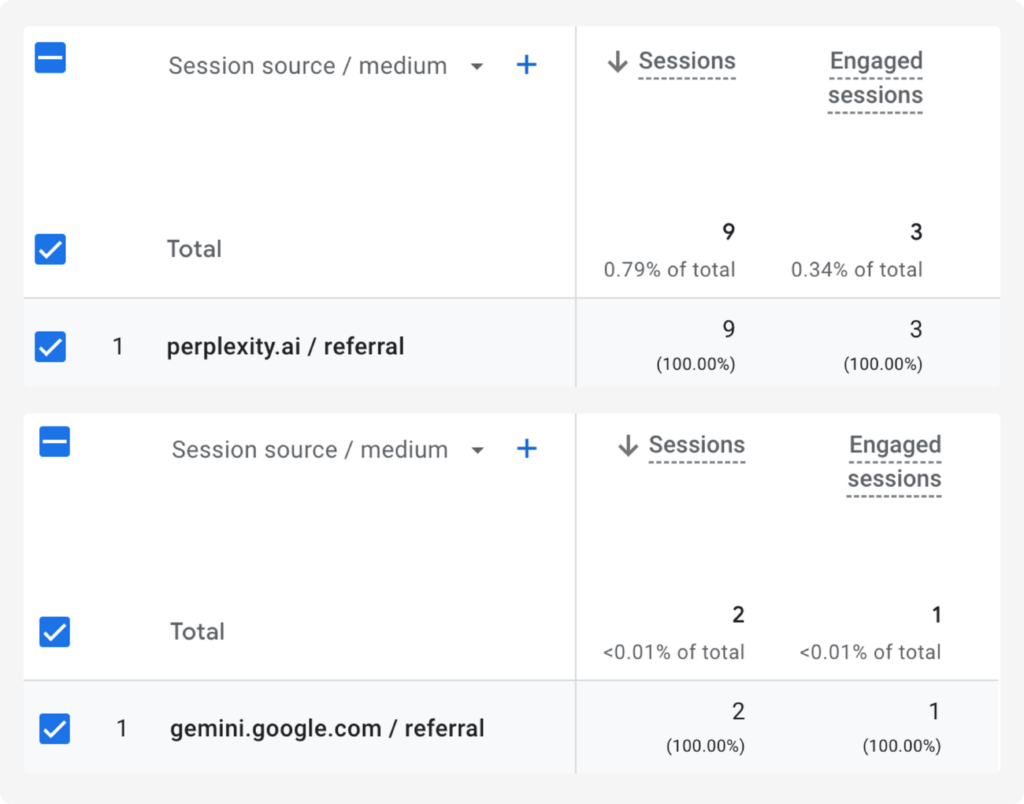
- Check the AI Assistant channel. Since May 2026, GA4’s default channel group includes an AI Assistant channel for recognised assistants such as ChatGPT, Gemini and Claude. Go to Reports → Acquisition → Traffic acquisition.
- Add session source as a secondary dimension to see which assistant sent each visit (chatgpt.com, perplexity.ai, gemini.google.com, copilot.microsoft.com…).
- Look for AI sources under Referral. If some assistants aren’t classified yet, create a custom channel group that includes them.
- Use UTM data. ChatGPT adds utm_source=chatgpt.com to many links, which helps when the referrer is missing, though tagging rates vary.
- Analyse behaviour and value in Explorations: landing pages, engagement rate, key events and revenue for the AI channel, compared with Organic Search.
Expect undercounting. Visits without a referrer appear as Direct, and in the EEA users who decline consent are only partly measured (Consent Mode). Make sure tracking itself is correct first; see e-commerce analytics audits.
What GA4 data tells you:
- Which platforms send traffic. In Ahrefs’ study, ChatGPT sent most AI referral traffic, followed by Perplexity and Gemini; check your own mix.
- How engaged AI visitors are: engagement rate, pages per session, time on site.
- What they’re worth: conversion rate and revenue. In Adobe’s data, AI referrals to US retail sites converted 31% better than other traffic (holiday 2025).
Free Looker Studio report by Insightland
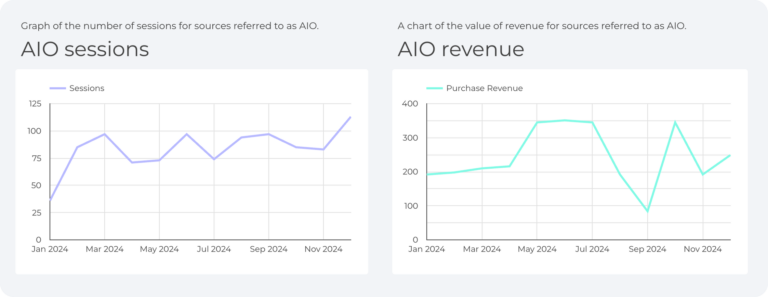
We work with data every day, so we built a free Looker Studio template for AI chatbot traffic. It connects to your GA4 property and shows:
- sessions from AI assistants, by platform and over time;
- landing pages that receive AI traffic;
- engagement, conversion rate and revenue from AI traffic, compared with other channels;
- AI traffic’s share of total and organic traffic.
Measure AI chatbot traffic, conversions and revenue in one Looker Studio dashboard. Download
Metrics worth tracking:
| Metric | Definition |
|---|---|
| AI sessions | Sessions from AI assistants (AI Assistant channel plus unclassified AI referrers) |
| AI share of traffic | AI sessions ÷ all sessions (benchmark: about 0.32% in SE Ranking’s 2026 data) |
| AI conversion rate | AI sessions with a key event ÷ AI sessions |
| AI revenue | Revenue from AI sessions |
| AI citations (Bing) and AI impressions (Google) | From Bing Webmaster Tools and Search Console |
Server log analysis: the missing piece
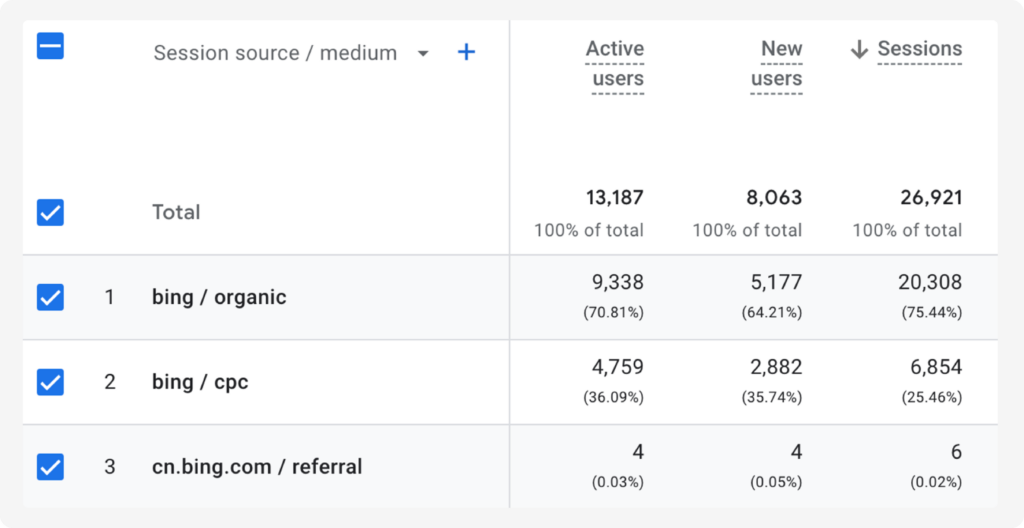
Server logs record every request to your server: IP address, time, URL, status code, referrer and user agent. They show AI bot activity that analytics tools can’t see, because bots don’t run your analytics tag.
Which AI bots should you look for?
| User agent | Operator | What it does |
|---|---|---|
| GPTBot | OpenAI | Collects data for training models; blocking it opts you out of training, not search |
| OAI-SearchBot | OpenAI | Crawls pages for ChatGPT search; blocking it removes you from ChatGPT search answers |
| ChatGPT-User | OpenAI | Visits a page when a ChatGPT user’s request requires it |
| ClaudeBot / Claude-User | Anthropic | Training crawler / user-triggered visits |
| PerplexityBot / Perplexity-User | Perplexity | Index crawler / user-triggered visits |
| Bingbot | Microsoft | Crawls for Bing, which also grounds Copilot |
| Googlebot | Crawls for Search, including AI Overviews and AI Mode |
Descriptions based on OpenAI’s crawler documentation and the operators’ own documentation. Verify bots by IP ranges where operators publish them; user agents can be faked.
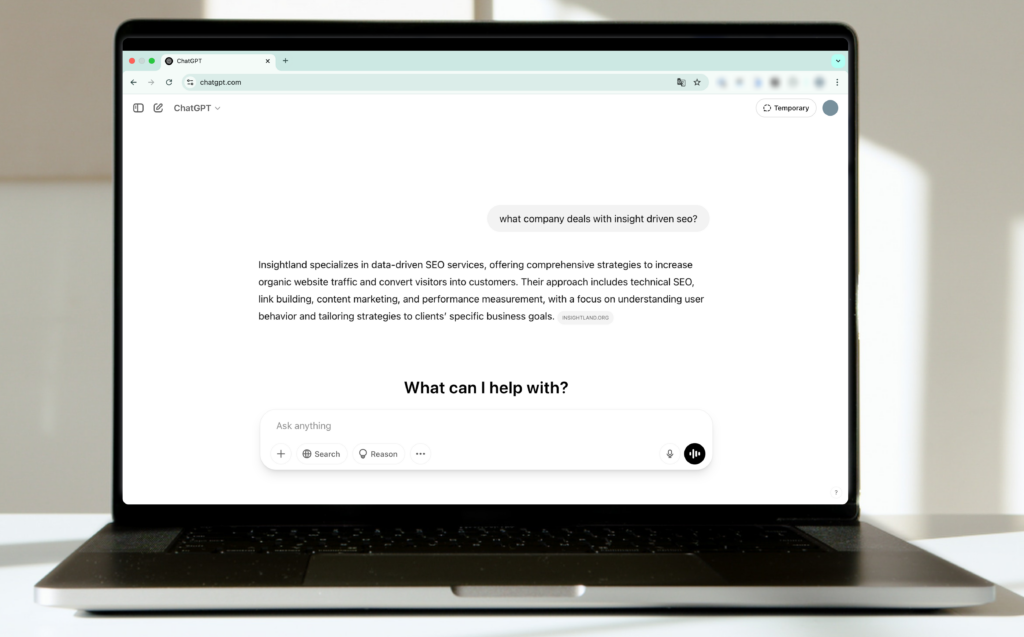
What can logs tell you about ChatGPT?
- Which pages ChatGPT fetches for users. A ChatGPT-User request means ChatGPT opened that page while handling a user’s request. Pages with frequent ChatGPT-User visits are being used in answers.
- Whether ChatGPT search can reach you. Regular OAI-SearchBot visits with 200 responses show your pages are being crawled for ChatGPT search; 403 or 404 errors point to problems.
- An approximate click-through rate. Comparing chatgpt.com sessions in GA4 with ChatGPT-User visits to the same URLs gives a rough indication of how often fetched pages lead to visits.
Important limits: a ChatGPT-User visit isn’t the same as your link being shown. ChatGPT can cite pages from its search index without fetching them again, one fetch can serve several mentions in one answer, and logs don’t show whether the link appeared in the answer or only under “Sources”.
What logs show that GA4 doesn’t
- AI bot visits, which never appear in GA4;
- the true scale of AI activity on your site, regardless of consent or referrers;
- crawl problems for AI bots: blocked paths, errors, slow responses;
- which content AI systems focus on, compared with what you want them to see.
Log analysis needs access to raw logs (from your server, CDN or hosting) and some technical work; tools such as Screaming Frog Log File Analyser or BigQuery help at scale. See GA4 and BigQuery.
Putting it together
No single source gives the full picture. Combine Search Console (Google AI impressions), Bing (Copilot citations), GA4 (visits and revenue), server logs (bot activity) and prompt monitoring (mentions and share of voice). For which metrics to report and how, see metrics that matter in AI search; for improving your visibility, see how to rank in ChatGPT and our GEO guide.
Want help setting up AI traffic measurement?
FAQ: measuring AI chatbot traffic
How do I see ChatGPT traffic in GA4?
Open Traffic acquisition and look at the AI Assistant channel (added in May 2026), with session source chatgpt.com. Visits without a referrer or UTM tag may still appear as Direct.
Can I see which ChatGPT prompts mention my brand?
Not from OpenAI. Bing Webmaster Tools shows grounding queries for Copilot, and prompt monitoring tools test your own set of prompts across platforms.
What does ChatGPT-User in my server logs mean?
ChatGPT visited that page while handling a user’s request. It shows your page is being used, but it isn’t a count of how often your link was displayed.
Should I block GPTBot?
Only if you don’t want your content used for training. Blocking GPTBot doesn’t affect ChatGPT search; blocking OAI-SearchBot does.
Why is my AI traffic so low?
Partly because it is low for most sites (about 0.3% of visits in 2026), and partly because of undercounting: missing referrers, consent and in-app browsers. Logs and AI reports help fill the gap.
Sources
- OpenAI: Overview of OpenAI crawlers
- Google Search Central: Search Generative AI performance reports (Jun 2026)
- Search Influence: Inside Bing’s AI Performance report (Feb 2026)
- Search Engine Journal: GA4 adds AI Assistant default channel group (May 2026)
- Search Engine Roundtable: ChatGPT adds more UTM parameters (Jun 2025)
- LLM Pulse: ChatGPT UTM tagging tracker (2026)
- TechCrunch: ChatGPT reaches 900M weekly active users (Feb 2026)
- Ahrefs: AI traffic study (2025)
- SE Ranking: AI traffic research study (2026)
- Adobe: AI-driven traffic surges across industries
About the author: Joanna Jelenik is Delivery Manager at Insightland. Insightland is a Wrocław-based SEO and GEO agency, part of the Hexe Capital Tech Hub. Contact us.